Balancing Hybrid and Multi-Cloud Strategies for Workload Distribution
 Feb 23, 2026
 IQZ Systems
In today's enterprise data landscape, the question is rarely "which cloud should we use?" but rather "how should we distribute our workloads across clouds and on-premises infrastructure?" The reality is that most organizations operate in hybrid and multi-cloud environments, whether by design or circumstance.
This article explores strategies for intelligently distributing data workloads across hybrid and multi-cloud environments. We'll examine the forces that drive workload placement decisions - data gravity, compliance requirements, cost optimization, and performance - and provide practical patterns for building architectures that span cloud boundaries effectively.
The Multi-Cloud Reality
Why Organizations Go Multi-Cloud
Acquisition-Driven Complexity
A mid-size enterprise's story illustrates common patterns. They started with AWS for their core infrastructure. Then they acquired a company running on Azure. Later, regulatory requirements forced certain workloads to remain on-premises. Suddenly, they're managing three environments, each with different tools, processes, and skillsets.
Strategic Multi-Cloud Adoption
But multi-cloud isn't always accidental. Organizations adopt multi-cloud strategies for:
- Vendor Leverage: Avoiding lock-in, negotiating better pricing
- Best-of-Breed: Using best services from each provider
- Risk Mitigation: Reducing dependency on single vendor
- Compliance: Meeting data residency requirements
- Performance: Locating workloads close to users or data sources
The Challenges
Data Gravity
Data has weight. The more data you have in a cloud, the more workloads want to run there. Moving 100TB of data between clouds costs time and money. The result: data gravity pulls workloads toward where data lives.
Operational Complexity
Managing multiple clouds means:
- Different APIs, tools, and processes
- Separate security and governance models
- Duplicated infrastructure and skills
- Increased operational overhead
Cost Management
Without careful planning, multi-cloud can increase costs:
- Data transfer (egress) charges
- Duplicated infrastructure
- Multiple vendor relationships to manage
- Inconsistent pricing models
Understanding Workload Characteristics
Workload Classification
Before distributing workloads, classify them by their characteristics:
1. Data-Intensive Workloads
Workloads that are tightly coupled to data location:
- Analytics queries scanning large datasets
- ML model training requiring large datasets
- Data transformation and ETL pipelines
Strategy: Keep data and compute together. Minimize data movement.
2. Compute-Intensive Workloads
Workloads that are less dependent on data location:
- ML inference with small input datasets
- Real-time streaming processing
- Batch processing with small data volumes
Strategy: Can be distributed based on cost, performance, or availability.
3. Latency-Sensitive Workloads
Workloads requiring low latency:
- Real-time dashboards
- API responses
- Interactive analytics
Strategy: Place close to users or data sources.
4. Compliance-Sensitive Workloads
Workloads with regulatory requirements:
- Data residency requirements
- Industry-specific compliance (HIPAA, GDPR, etc.)
- Government or financial regulations
Strategy: Must be placed in specific regions or environments.
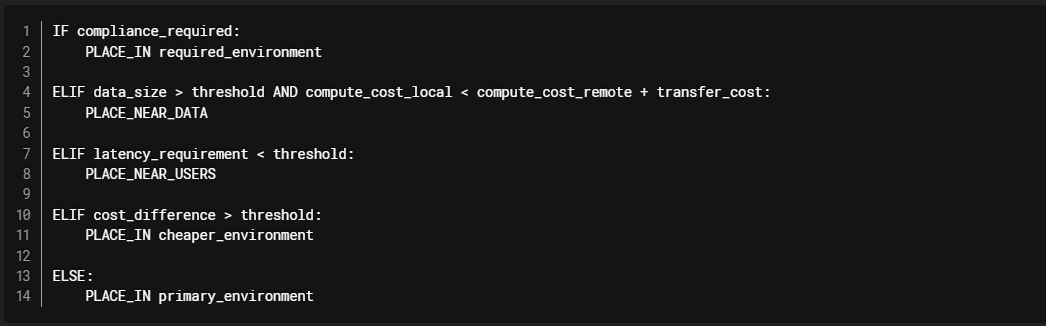
Workload Placement Decision Framework
Hybrid Cloud Patterns
Pattern 1: Cloud-First with On-Premises Bridge
Use Case: Organizations migrating to cloud but with legacy systems on-premises.
Architecture:

Databricks Implementation:

Benefits:
- Leverage cloud analytics capabilities
- Maintain on-premises systems during migration
- Gradual transition path
Challenges:
- Network latency and bandwidth constraints
- Security and compliance considerations
- Data synchronization complexity
Pattern 2: Cloud Burst for Peak Loads
Use Case: On-premises infrastructure with cloud for capacity peaks.
Architecture:

Databricks Implementation:

Benefits:
- Cost-effective for variable workloads
- Maintains primary infrastructure on-premises
- Handles peak loads without over-provisioning
Challenges:
- Data synchronization for bursting
- Network costs for data transfer
- Complexity in managing two environments
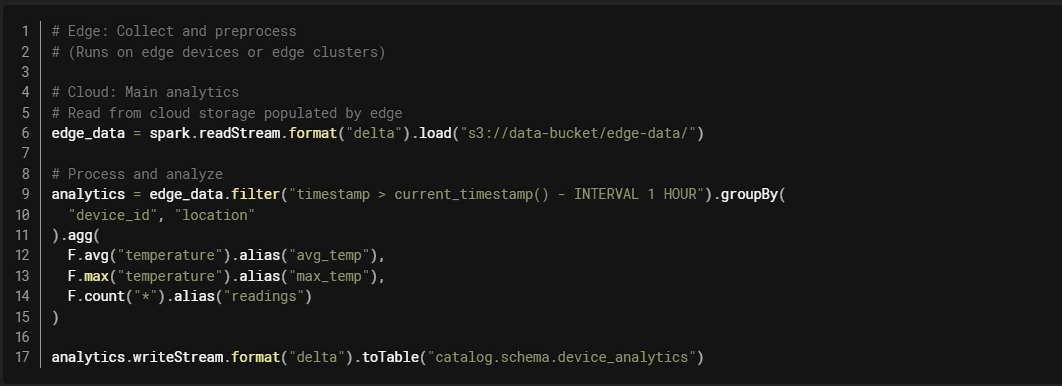
Pattern 3: Edge-to-Cloud Pipeline
Use Case: Data collection at edge, processing and analytics in cloud.
Architecture:

Databricks Implementation:
Benefits:
- Reduces data transfer by preprocessing at edge
- Low latency for local processing
- Centralized analytics in cloud
Multi-Cloud Patterns
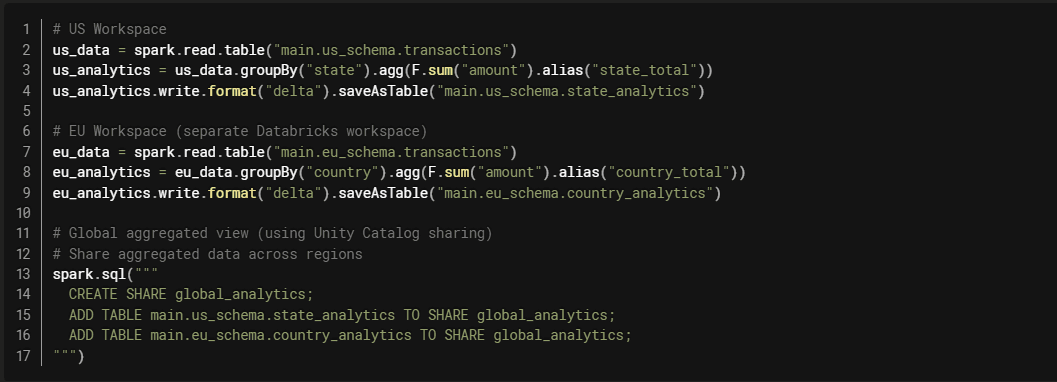
Pattern 1: Region-Specific Workloads
Use Case: Data residency requirements or proximity to users.
Architecture:

Databricks Implementation with Unity Catalog:
Benefits:
- Meets data residency requirements
- Low latency for regional users
- Compliance with local regulations
Challenges:
- Managing multiple workspaces
- Aggregating across regions
- Ensuring consistency
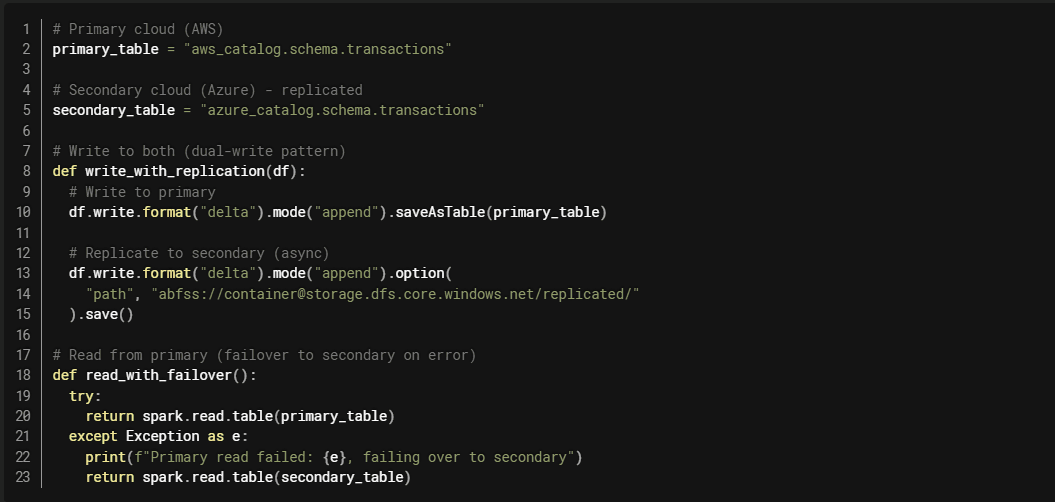
Pattern 2: Active-Active Multi-Cloud
Use Case: High availability and disaster recovery.
Architecture:
 Databricks Implementation:
Benefits:
- High availability
- Disaster recovery
- Load distribution
Challenges:
- Data synchronization complexity
- Increased costs
- Operational complexity
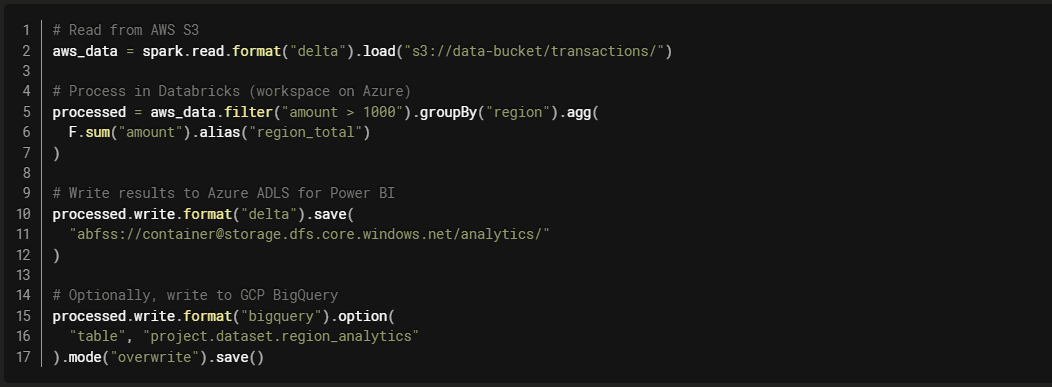
Pattern 3: Workload-Optimized Distribution
Use Case: Using best services from each cloud.
Architecture:

Databricks Implementation:
Benefits:
- Leverage best services from each cloud
- Unified compute layer (Databricks)
- Flexibility in data storage
Challenges:
- Data transfer costs
- Complexity in managing multiple clouds
- Network latency considerations
Unity Catalog: The Multi-Cloud Governance Layer
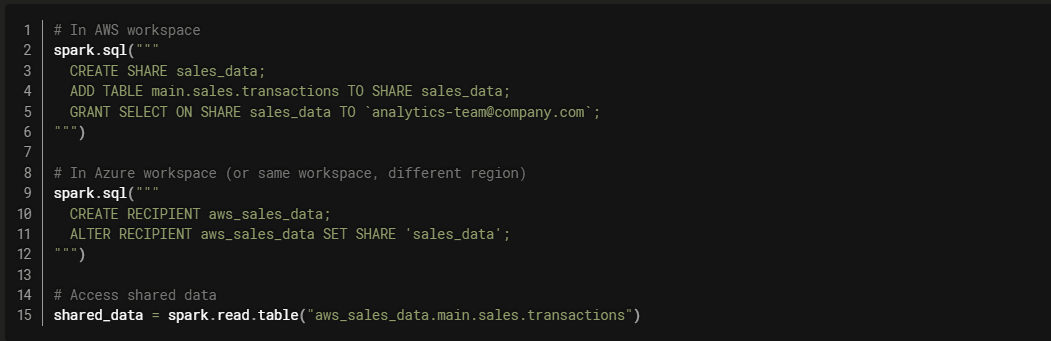
Cross-Cloud Data Sharing
Unity Catalog enables seamless data sharing across clouds and regions:
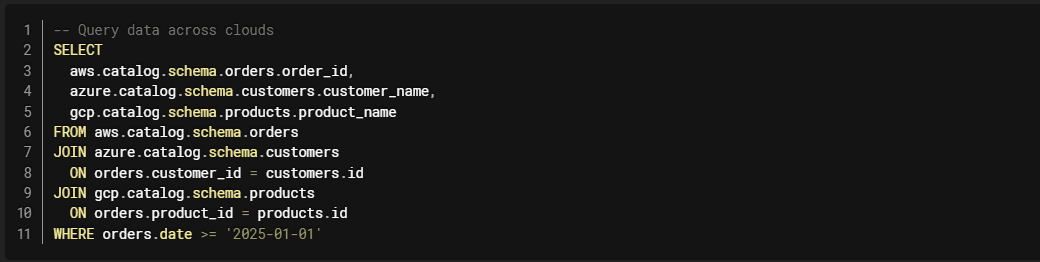
Cross-Cloud Federation
Unity Catalog Federation allows querying data across clouds without moving it:
Cost Optimization Strategies
1. Minimize Data Transfer (Egress)
Problem: Data transfer between clouds costs $0.01-0.12 per GB.
Solutions:
- Compute Near Data: Keep compute in same region as data
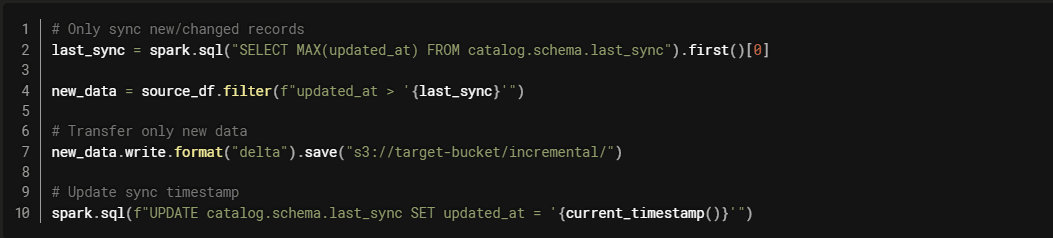
- Incremental Sync: Only transfer changed data
- Aggregate Before Transfer: Send summaries instead of raw data
- Use CDN/Edge: Cache frequently accessed data
Example: Incremental Sync
2. Right-Size Compute Across Clouds
Strategy: Use cheaper compute in each cloud for appropriate workloads.

3. Reserved vs. On-Demand Balance
Strategy: Use reserved capacity for predictable workloads, on-demand for variable.

Network and Connectivity
Direct Connect / ExpressRoute / Interconnect
AWS Direct Connect:
- Dedicated network connection
- Reduced data transfer costs (up to 75% reduction)
- Consistent network performance
Azure ExpressRoute:
- Private connection to Azure
- Predictable performance
- Lower latency than internet
GCP Cloud Interconnect:
- Dedicated or partner connection
- Reduced egress costs
- Higher bandwidth options
VPN Connections
For smaller scale or backup connectivity:

Security and Compliance
Data Residency
Challenge: Some data must remain in specific regions.
Solution: Regional workspaces with Unity Catalog governance.

Encryption and Key Management
Cross-Cloud Key Management:

Network Security
Private Endpoints: Use private connectivity between clouds.
VPC Peering: Connect VPCs across clouds (where supported).
Firewall Rules: Restrict access between environments.
Network Isolation: Separate networks for different workloads.
Monitoring and Observability
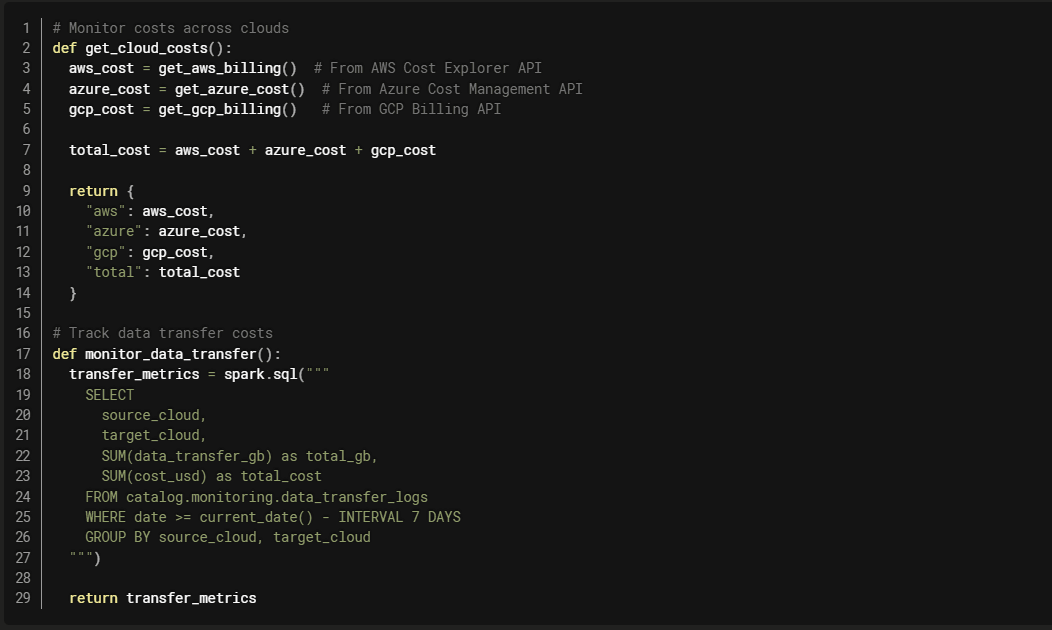
Cross-Cloud Monitoring
Unified Observability
Use Databricks System Tables for cross-cloud visibility:

Best Practices
1. Start with Clear Strategy
- Define workload placement criteria
- Document data residency requirements
- Establish governance policies
- Plan for cost management
2. Minimize Data Movement
- Keep compute near data
- Use incremental sync patterns
- Aggregate before transferring
- Leverage federation when possible
3. Implement Unified Governance
- Use Unity Catalog for cross-cloud governance
- Centralized access control
- Consistent data quality standards
- Unified lineage tracking
4. Monitor and Optimize
- Track costs across clouds
- Monitor data transfer
- Optimize workload placement
- Review and adjust regularly
5. Plan for Disaster Recovery
- Define RTO and RPO requirements
- Implement backup and replication
- Test failover procedures
- Document recovery processes
Common Pitfalls
Pitfall 1: Ignoring Data Gravity
Problem: Trying to force workloads to cheaper clouds despite data being elsewhere.
Solution: Calculate total cost including data transfer. Often, it's cheaper to compute near data.
Pitfall 2: Over-Engineering
Problem: Building complex multi-cloud architecture when single cloud would suffice.
Solution: Start simple. Only add multi-cloud complexity when necessary.
Pitfall 3: Inconsistent Governance
Problem: Different governance models in each cloud.
Solution: Use Unity Catalog for unified governance across clouds.
Pitfall 4: Neglecting Costs
Problem: Not tracking costs across clouds.
Solution: Implement cost monitoring and alerting. Regular cost reviews.
Real-World Example: Global Retailer
Challenge:
- Operations in US, EU, and APAC
- Data residency requirements in each region
- Need for global analytics
- Cost optimization across regions
Solution:
- Regional Databricks workspaces (US, EU, APAC)
- Regional data stored in local cloud storage
- Unity Catalog for cross-region data sharing
- Aggregated analytics in primary region
- Serverless compute for cost efficiency
Results:
- Compliant with regional data residency requirements
- 40% cost reduction vs. single-region approach
- Improved performance (local compute)
- Unified governance across regions
Conclusion
Balancing hybrid and multi-cloud strategies requires careful consideration of data gravity, compliance requirements, costs, and performance. The key is to:
Understand your workloads: Classify by data dependency, latency, and compliance needs.
Minimize data movement: Keep compute near data to reduce costs and latency.
Implement unified governance: Use Unity Catalog for consistent governance across clouds.
Monitor and optimize: Track costs and performance, adjust placement as needed.
Plan for the long term: Design architectures that can evolve with changing requirements.
 IQZ SystemsFeb 23, 2026
 34
34 IQZ SystemsFeb 23, 202625